

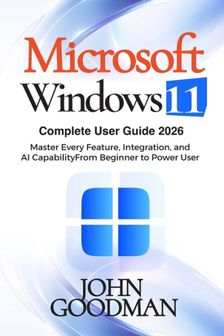
Windows Libri GmbH Windows 11 Complete User Guide Paperback
We konden geen prijzen vinden voor dit productGelukkig hebben we een paar sterke alternatieven voor je gevonden, deze vind je verder op de pagina.
Vergelijkbare of betere producten
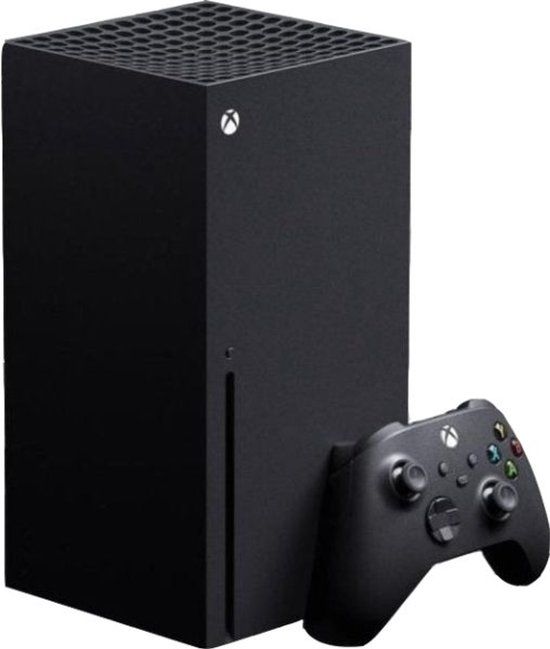
Xbox Series X 1TB - Zwart - Disc - Console
Bekijk productBekijk product 9.5(2)
Ja|21,1 cm|1|Nee
v.a. € 896,00
-1%
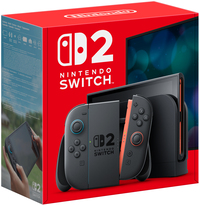
Nintendo Switch 2 - Zwart
Bekijk productBekijk product10015151|Nintendo|Zwart|Nintendo Switch 2
v.a. € 429,99
-3%

IO Interactive 007 First Light - Incl. Deluxe Upgrade Pack - PS5
Bekijk productBekijk productPlayStation 5|16|Standard Edition|Actie
v.a. € 58,98
-2%

Nintendo Tomodachi Life - Nintendo Switch
Bekijk productBekijk productStandard Edition|Disc|Nintendo Switch|3
v.a. € 54,95
- Multiplayer
- Verpakking hoogte
- Aantal ethernet poorten
- Virtual Reality mogelijkheden
- Vanaf prijs
9.5(2)
- Ja
- 21,1 cm
- 1
- Nee
- v.a. € 896,00Bekijk product-1%
- -
- -
- -
- -
- v.a. € 429,99Bekijk product-3%
- -
- -
- -
- -
- v.a. € 54,95Bekijk product
Overige kenmerken
- Verpakking breedte
- 15,2 cm
- Draairichting
- Nee
- Verpakkingsgewicht
- 195 g
- Verpakking hoogte
- 1 cm
- Product breedte
- 15,2 cm
- Product lengte
- 22,9 cm
- Verpakking lengte
- 22,9 cm
- EAN
- 9798199178457
Productomschrijving
Windows 11 Complete User Guide
A Step-by-Step Guide for Beginners and SeniorsStruggling to understand Windows 11? Want to use your computer with confidence without feeling overwhelmed?Windows 11 Complete User Guide is the perfect beginner-friendly handbook designed to help users of all ages navigate Microsoft's latest operating system with ease. Whether you are completely new to computers, upgrading from Windows 10, or simply looking to improve your skills, this practical guide walks you through everything step by step in simple, easy-to-follow language.Inside this comprehensive guide, you will learn how to: - Set up and personalize Windows 11- Navigate the new Start Menu and Taskbar- Manage files, folders, and storage- Connect to the internet and use Microsoft Edge- Install and manage apps- Use built-in productivity tools- Protect your computer with essential security settings- Troubleshoot common Windows 11 problems- Discover hidden features, shortcuts, and time-saving tips- Improve speed, performance, and battery lifeDesigned especially for beginners and seniors, this book removes the confusion from technology and provides clear instructions with practical examples that make learning easy and enjoyable.Whether you want to browse the internet, work efficiently, attend online meetings, organize your files, or simply become more confident using your PC, this guide gives you everything you need to master Windows 11.No technical experience required, just open the book and start learning today!
A Step-by-Step Guide for Beginners and SeniorsStruggling to understand Windows 11? Want to use your computer with confidence without feeling overwhelmed?Windows 11 Complete User Guide is the perfect beginner-friendly handbook designed to help users of all ages navigate Microsoft's latest operating system with ease. Whether you are completely new to computers, upgrading from Windows 10, or simply looking to improve your skills, this practical guide walks you through everything step by step in simple, easy-to-follow language.Inside this comprehensive guide, you will learn how to: - Set up and personalize Windows 11- Navigate the new Start Menu and Taskbar- Manage files, folders, and storage- Connect to the internet and use Microsoft Edge- Install and manage apps- Use built-in productivity tools- Protect your computer with essential security settings- Troubleshoot common Windows 11 problems- Discover hidden features, shortcuts, and time-saving tips- Improve speed, performance, and battery lifeDesigned especially for beginners and seniors, this book removes the confusion from technology and provides clear instructions with practical examples that make learning easy and enjoyable.Whether you want to browse the internet, work efficiently, attend online meetings, organize your files, or simply become more confident using your PC, this guide gives you everything you need to master Windows 11.No technical experience required, just open the book and start learning today!
Reviews
Er zijn nog geen reviews geschreven
Heb jij dit product in bezit en wil je graag je mening geven? Start dan hieronder met het schrijven van je review. Afhankelijk van de details duurt het schrijven van een review gemiddeld tussen de 3 en 10 minuten. Met jouw mening help je andere bezoekers een betere keuze te maken én maak je iedere maand kans op €250,-! Klik hier voor de actievoorwaarden.